It has been about a week since I announced my first project, and I am happy to say I actually built the thing. It is not perfect, there are things I want to improve, but the core game is there and it works. More importantly, I had fun building it, and that was the whole point.
This is what it looks like:
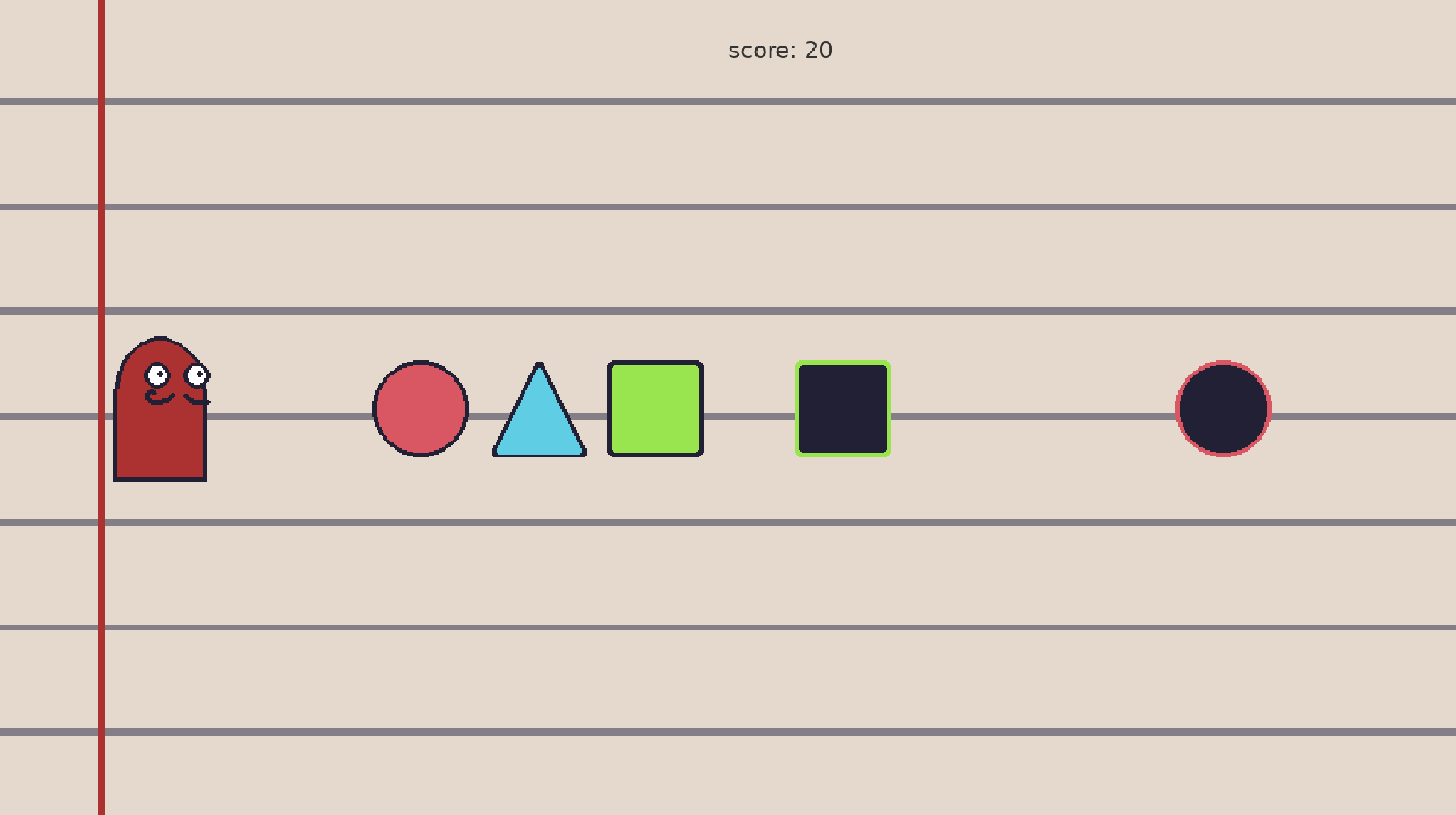
I created this AMAZING ART using aseprite, a tool to create pixel art. As you can see the game differs a little bit from the original idea: There are no buttons on the screen. The reason for that is that the first version was thought for a mobile game, this one is for PC so I instead assigned keyboard input for each one of the shapes.
Choosing the tools
As I mentioned in my last post, the language was decided for me: Lua. If any of you has ever tried to build a game, you know physics, collisions and all that comes to it is not an easy task, thankfully for me, there is an amazing framework/library that uses Lua for game development and handles that perfectly: Love2d (check it here).
LOVE gives you the game loop out of the box: love.load(), love.update(dt), love.draw(), and love.keypressed(). If you have ever worked with a game engine, this pattern will feel familiar. The difference is that there is no editor, no drag-and-drop, no visual scripting. It is just you, your code, and the documentation. Exactly what I wanted.
Building the game
The first thing I had to figure out was how to structure the project. Lua does not have built-in classes or objects the way C# does in Unity, so after some research (thanks sheepolution for the amazing blog) I pulled in a tiny library called classic that gives you a simple Object:extend() pattern for inheritance. With that, I was able to build a Shape class that handles everything a shape needs: a sprite, a position, a velocity, a physics body, and whether it belongs to the player or the enemy. I also used a library called Push to handle screen resolution and scaling, so the game doesn’t look weird at different window sizes. Not the most elegant solution, but it did the trick perfectly. This is what the Shape “class” looks like:
Shape = Object:extend()

function Shape:new(x, y, sprite, speed, w, s, team)
        self.x = x
        self.y = y
        self.s = s
        self.sprite = love.graphics.newImage(sprite)
        self.width = self.sprite:getWidth()
        self.height = self.sprite:getHeight()
        self.speed = speed
        self.body = love.physics.newBody(w, self.x, self.y, "dynamic")
        self.shape = love.physics.newRectangleShape(self.width, self.height)
        self.fixture = love.physics.newFixture(self.body, self.shape)
        self.state = "alive"
        self.team = team

        self.fixture:setUserData(self)
end

function Shape:update(dt)
        self.body:setLinearVelocity(self.speed, 0)
        self.x, self.y = self.body:getPosition()
end

function Shape:draw()
        if self.state == "alive" then
                love.graphics.draw(self.sprite, self.x, self.y)
        end
end

return Shape
For physics I used LOVE’s built-in Box2D integration. Every shape in the game is a proper physics body with a fixture (fixtures are similar to having a collider with a rigidBody attached in Unity) and collision detection. I will be honest, setting up Box2D was the part that took me the longest. It is not complicated once you understand it, but coming from Unity where you just tick a box that adds a collider to having to manually create bodies, shapes, and fixtures felt like a lot. But that is the point, right? Understanding what actually happens under the hood instead of letting an engine abstract it all away.
The collision logic ended up being the heart of the game. When a player shape collides with an enemy shape of the same type (triangle vs triangle, circle vs circle, square vs square), both get destroyed and the player scores points. If the shapes don’t match, only the player’s shape gets destroyed. And if an enemy reaches the player character, you lose a life. Three lives and you are done:
function OnCollisionEnter(a, b, contact)
        if a == player.fixture or b == player.fixture then
                local other = a == player.fixture and b or a
                ud = other:getUserData()
                ud.state = "ded"
                player.health = player.health - 1
                other:destroy()
                return
        end

        ad = a:getUserData()
        bd = b:getUserData()
        if ad.s == bd.s then
                if ad.team == bd.team then return end
                ad.state = "ded"
                a:destroy()

                bd.state = "ded"
                b:destroy()

                player.score = player.score + score_per_enemy
        else
                if ad.team == "ally" then
                        ad.state = "ded"
                        a:destroy()
                end
                if bd.team == "ally" then
                        bd.state = "ded"
                        b:destroy()
                end
        end
end
If you check the code, you can see that destroying an item in Love2d is not as easy as it would be in Unity, where you can simply say Destroy(gameObject), embarrassingly that part took me waaay longer than I will ever admit to figure out. I did somehow though!
The progression system
One thing I wanted to get right was the difficulty curve. In the original Unity version, I remember it feeling either too easy or suddenly impossible. This time I went with an exponential scaling approach: every time the player’s score crosses a threshold, the enemy spawn rate gets a bit faster (multiplied by 0.95), the points per enemy increase, and the threshold for the next level goes up. I also capped the minimum spawn rate at 1.5 seconds so the game doesn’t become literally impossible. It still gets hard, but it feels fair, and that balance took some tweaking to get right. That part is still not the optimal way of doing it, but it looks something like this at the moment:
if player.score > next_level then
    enemy_spawn_rate = enemy_spawn_rate * .95
    score_per_enemy = math.floor(score_per_enemy * 1.2 + 0.5)
    next_level = math.floor(next_level * 1.2 + 0.5)
    if enemy_spawn < 1.5 then enemy_spawn = 1.5 end
end
And it does the trick.
Things I learned
A few things stood out to me during this build:
I AM RUSTY. I spent more time on the LOVE wiki and Lua reference manual than I have spent reading docs in months. It was slow at first, but by the end of the project I was navigating the API confidently. It is a very different experience from typing a question into an LLM and getting a ready-made answer. Slower, yes, but I actually retained what I learned.
I remembered real debugging. Not pasting an error into a chat and waiting for a response, but actually reading the error message, thinking about what could cause it, adding some print statements, and tracing the logic myself. As I said I spent a LONG time figuring out collisions, movements with the rigid body (it took me a while to realise I had to update the world with world:update() for anything to update in the game). I spent longer than expected to figure some basic things out, but when I did, it felt great, and the best part, I remember it now. That is the feeling I was missing.
What is next
The game works, but it is far from finished. There are a few things I should add to make the game “prod ready”:
- A proper game over screen: At the moment, the game just restarts when you lose all your health points. Not exactly a polished experience.
- Health display on screen: The player has no idea how many lives they have left. That is a problem. I was just too lazy to go on aseprite again and draw the health points.
- Some kind of start screen, and a pause menu: Right now the game starts immediately when you launch it, you cannot pause and the game runs infinitely.
- Clean up the code: There are some things I am not proud of, like the enemy spawning logic and some hardcoded values that should probably be set up properly. I should probably also separate some logic in different files.
- Adding a game state manager: Currently the game has only one game state, that’s never the right call.
- Adding a “Best Score” leaderboard: I just think that would be fun.
But even in its current state, I am proud of it. I built a working game in a language I barely knew, using a framework I had never touched, without any AI assistance. It is not much, but it is mine, and I understood every single line I wrote. That is the difference.
I will keep improving Shaper on the side, but next week I am probably going to start working on a new project. I’ve been thinking about trying out Ruby on Rails, Phoenix (Elixir) or even going back to Python, a language I stopped liking a while ago but I am curious about at the moment. I’ll let you know how it goes once I decide a project. If you want to have a look at the game, here is the repo: Shaper
As always, thanks for reading.